Introduction: Why We Took a Holistic Approach
Performance is a critical part of the guest experience—especially at Target's scale. With millions of guests relying on the Target app for AndroidTM for everything from browsing deals to Drive Up orders, every second of startup time and every frame of scrolling matters. A fast, responsive app builds trust and keeps guests coming back.
This is the story of how the Target team for Android stopped optimizing in silos and started thinking about performance as an ecosystem.
When we set out to improve the performance of the Target app for Android, we realized: Individual optimizations are good, but they're not the full story.
R8 full mode gives you a 6% APK reduction. Baseline Profiles improve startup by 10%. Resource shrinking saves a few more megabytes. But the real magic happens when these work together—like a relay race where success depends on how well runners pass the baton.
Why These Optimizations Amplify Each Other

The real power comes from how these techniques reinforce one another.
R8 Full Mode removes unused code, which means Baseline Profiles have a cleaner, more focused codebase to optimize.
Resource Shrinking reduces I/O operations, so fewer files need to load, complementing the faster code execution.
Baseline Profiles pre-compile the hot paths that matter, allowing ART to focus on what guests commonly use.
And Startup Profiles arrange DEX files so critical classes load first, building on R8's already-smaller output.
Our Journey: Building Performance Layer by Layer
The Starting Point
The Target ap for Android had been using R8 in compatibility mode. Compatibility mode is the safer, more conservative option. It performs basic optimizations while minimizing the risk of breaking reflection-based code. It served us well, but we knew we were leaving performance on the table.
Our peak shopping seasons (back-to-school, holidays) put significant load on the app, and we wanted to ensure every guest had a smooth experience, regardless of their device.
Layer 1: Smarter Resource Management
Our first step was establishing a solid foundation. We upgraded to Android Gradle Plugin 8.12.3 and enabled optimized resource shrinking with a single line in our gradle.properties:
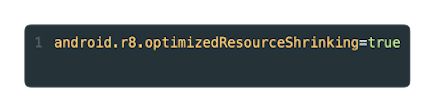
Before optimizing code execution, we wanted to ensure we weren't shipping unnecessary baggage. The results exceeded expectations: Our APK shrank by ~3%, but the real win was eliminating ~32% of our resource files entirely. The res/ folder became ~16% smaller, and resources.arsc dropped by ~6%. That reduction in resource file count was particularly meaningful because fewer files mean fewer I/O operations during app initialization — a benefit that compounds with every cold start.
Layer 2: Profiling Guest Journeys
Next, we turned our attention to Baseline Profiles. Instead of profiling everything, we focused strategically on what matters most for guests: the path from discovery to purchase.
Guest Journey Coverage:
Home → First impression, browsing entry point
Product List → Discovery and search results
Cart → Purchase intent, high engagement
Checkout → Conversion critical path
Baseline Profiles work by precompiling critical code paths, guiding Android on which methods to optimize ahead of time (AOT). This eliminates the Just-In-Time compilation delays that guests would otherwise experience on their first interactions with each screen.
Our profile generators simulate real guest interactions, loading each screen, scrolling through content, and capturing all the hot code paths along the way:
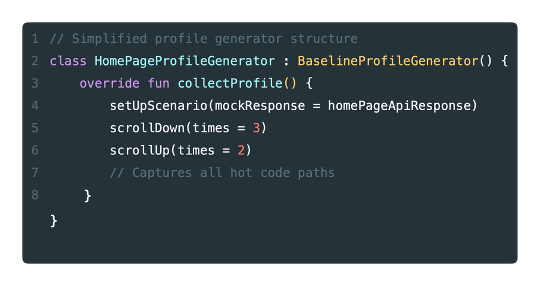
One lesson learned early is that physical devices matter. Our initial attempts on emulators gave inconsistent, unreliable results. Switching to physical devices for profile generation gave us the reproducibility we needed.
The impact on memory was substantial. We saw an average of ~18% memory reduction across our profiled screens, with Checkout seeing the highest improvement at ~31%. Since Checkout is our most critical screen for conversion, reducing memory pressure there means smoother experiences across all device tiers.
Layer 3: Unleashing R8 Full Mode
The final and most impactful layer was enabling R8 full mode, the most aggressive optimization setting available.
Up until this point, we had been running R8 in compatibility mode. Compatibility mode optimizes conservatively, respecting boundaries that might be important for reflection-heavy libraries. Full mode takes a different philosophy: everything is fair game for optimization unless you explicitly protect it. It questions whether every interface and class is actually used at runtime, and if it can't prove something is needed, it removes it.
Enabling full mode was straightforward, we simply removed the flag that was holding us back:
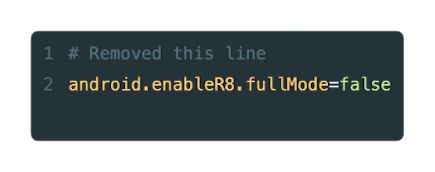
The critical ingredient that made this work was investing in keep rules. Full mode aggressively removes code it thinks is unused, and libraries that rely on reflection, JSON parsers, networking libraries, and authentication SDKs need explicit rules to prevent runtime crashes. We added targeted keep rules for our third-party dependencies while keeping them minimal to maximize optimization benefits.
The results were our most significant yet. Startup time improved by ~11% when combined with Baseline Profiles (or ~6% with partial compilation alone), and APK size dropped another ~6%. Memory usage also improved by an average of ~14% across key screens. Combined with the Baseline Profile gains from Layer 2, our critical screens were now running leaner than ever.
The Combined Effect: More Than Addition
When you look at each optimization in isolation, you see incremental gains. But apply them together and the combined effect becomes multiplicative, not additive. R8 removes dead code, giving Baseline Profiles a cleaner codebase to work with. Those pre-compiled hot paths are then arranged more effectively by Startup Profiles. Meanwhile, resource shrinking reduces I/O overhead, and a smaller APK means less to download, verify, and decompress at install time. Each layer amplifies the others.
The cumulative impact tells the story: Our APK is now ~10% smaller overall, cold startup is up to 11% faster, and memory usage dropped by ~15-30% across key screens. Frame rendering improved by up to 20%, and we're shipping ~32% fewer resource files.
But the metrics that matter most are what guests actually experience. According to Android Vitals, slow cold start sessions dropped by ~33% after these optimizations shipped. Our Play Store rating improved by ~12%, and perhaps most telling, performance-related complaints in reviews have essentially disappeared.
Release Timeline
We didn't ship all of this at once. Our performance journey rolled out across multiple releases, each building on the last:
| Release | What Shipped | Key Benefit |
| v2025.40.0 | AGP 8.12.3 + Optimized Resource Shrinking | ~32% fewer resource files, ~3% smaller APK |
| v2025.45.0 | Baseline Profiles for Home, Product List, Cart, Checkout | Up to ~31% memory reduction on key screens |
| v2025.46.0 | Baseline Profile infrastructure & CI integration | Sustainable, automated profile generation |
| v2026.2.0 | R8 Full Mode | ~11% faster startup, ~6% smaller APK |
Building for Sustainability: Benchmarking Infrastructure
Performance optimization is a continuous commitment, not a one-time effort. To maintain these gains, we built infrastructure that runs automated nightly benchmarks tracking memory and frame metrics for each key screen. All metrics flow into Grafana dashboards, giving us visibility into trends over time and catching regressions before they ship. Baseline Profiles are regenerated with each release to capture any new code paths introduced by feature development, ensuring our profiles stay current as the app evolves.
Reflections: What We Learned Along the Way
This was a journey that spanned multiple releases, and it wasn't without its challenges. Enabling R8 full mode surfaced edge cases in third-party libraries that required careful keep rule tuning. Baseline Profile generation on emulators proved unreliable, pushing us toward physical devices. And coordinating the rollout across peak shopping seasons meant we had to be methodical, validating each layer before stacking the next.
But the results made it worthwhile. What started as an exploration of individual optimizations evolved into a holistic performance strategy that delivered a ~10% smaller APK, up to 11% faster startup, and memory reductions of up to 31% on our most critical screens. More importantly, we now have the infrastructure to sustain and build on these gains.
If there's one thing this work reinforced, it's that performance optimization is most powerful when treated as an ecosystem. Cover all the pillars: R8, resource shrinking, Baseline Profiles, and Startup Profiles because each fills gaps the others can't address. Test thoroughly, especially when enabling aggressive optimizations like R8 full mode. Use physical devices for profile generation. Invest in well-maintained keep rules. And monitor continuously, because the moment you stop watching is the moment regressions creep in.
References:
- Android Performance Documentation
- R8 Optimization Guide
- Baseline Profiles Documentation
- Macrobenchmark Library